
Purpose
This article provides information on striking out notes in DocNow.
Audience
DocNow users and administrators.
Overview
DocNow users may strike out notes that have been signed.
- DocNow supports strike out for integrated and non integrated facilities.
- PointClickCare (PCC) notes may be struck out when using 3-legged authentication (log into PCC while in DocNow) but will only be struck out within DocNow when using 2-legged authentication (no sign in for PCC in DocNow). Without facility admin intervention strikeouts using 2-legged authentication will still show in PointClickCare.
- Matrix notes may be struck out but will only be struck out within DocNow - without facility admin intervention they will still show in Matrix.
- Striking out a note it will be omitted from any relevant reporting
Table of Contents
Admin Set Up
- Company permission Note Strike Out must be enabled by DocNow
- Admin must enable the user permission Note Strike Out for individual users who are enabled to strike out notes
Provider Workflow
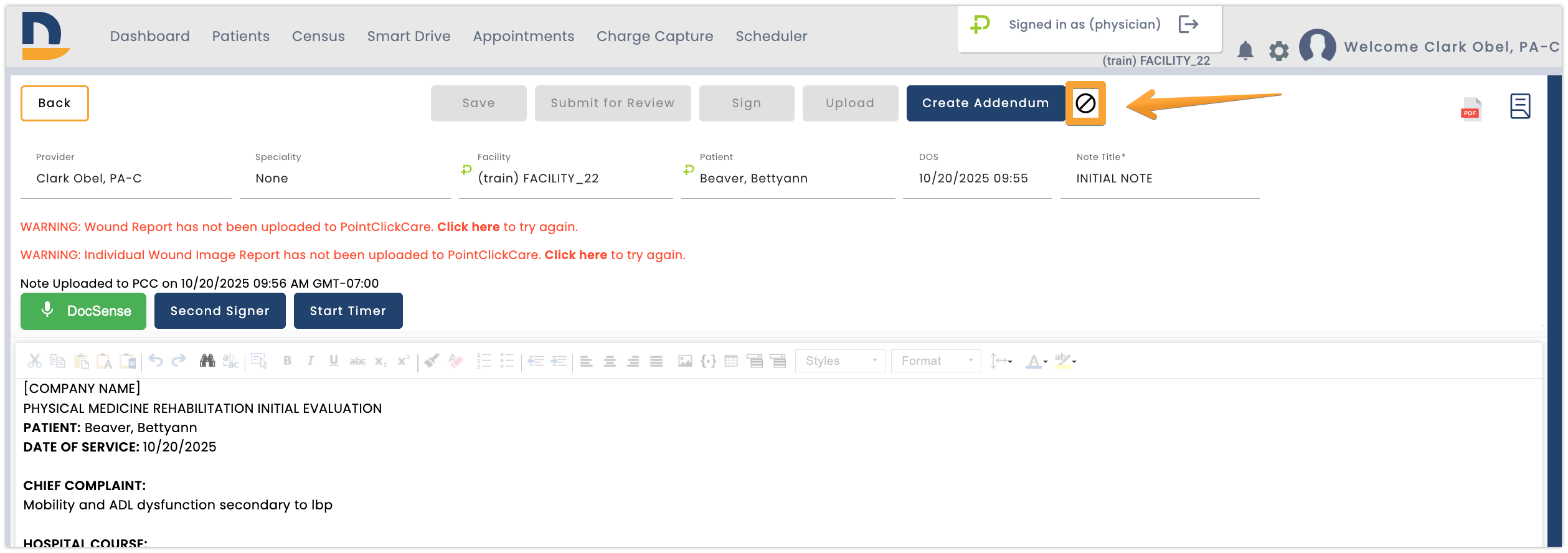
After a provider has successfully signed a note there will be a Strike Out icon near the Sign button in the note interface. Select the icon to strike out the note.
Point Click Care (PCC) Notes
- When striking out a note that was uploaded in an integrated PCC facility, the strike out will only show up within PCC when using 3 legged authentication e.g. the user must be signed into the PCC facility within DocNow.
- If using 2-legged authentication the note will only be struck out within DocNow. Please contact facility administrator to have the note struck out or removed from PCC.
- When a note is struck out while using PCC 3 legged authentication it will add strikethrough text to the note within PCC
Matrix Notes
When striking out a note that was uploaded in an integrated Matrix facility, the note will only be struck out within DocNow. Please contact facility administrator to have the note struck out or removed from Matrix.
All Facilities Notes
- When a note is struck out the strike out icon will change to red and will have strikethrough text in the title.
- Striking out omits notes from any relevant reporting.
- When viewing note information from reporting on the admin dashboard struck out notes will have strikethrough text in the title.
Comments
0 comments
Article is closed for comments.